Ever since I discovered Obsidian in 2022 it has completely changed how I think about my own knowledge management. I have one database that I use for my everyday personal notes, and another one that I use for work. They have very different purposes. I’ve just spent time reworking my personal database, and you read about that here if you are so inclined.
I started a new job in October 2023 which has been exciting and amazing for a number of reasons, one of which is definitely that it gave me a prime opportunity to build a new Obsidian vault! I had set one up for work in my old job, but that was six years in and I already had a lot of accumulated knowledge that was in my head but never really noted anywhere.
This time round I was starting a totally fresh and armed with lessons I learned from my previous job.
I’ve had a lot to learn at my new company (and still do!) – entirely new software, more technical skills, processes, products, people, systems, and I have a lot more internal meetings. Having Obsidian took so much pressure off feeling like I needed to remember this stuff because I can now trust that I am saving it somewhere I can easily find it again.
The beauty of Obsidian it that it is so flexible, you can really set it up in whatever way works for your brain. So I am going to share with you what works for me with my job, which may or may not be an approach that would work for you and whatever you need to achieve.
It is worth noting I do something completely different for my personal Vault!
Plugins
These are the Community plugins that I use, because this is on my work machine I only use what I consider my tried and tested “essentials” –
- Dataview – essential for surfacing notes in a friendly way.
- Tasks – obviously I have a lot to tasks to do!
- Tag Wrangler – makes light work of updating tags if/when I decide to reclassify anything.
- Minimal theme – it just looks so much better!
Folders
Though some may say that Obsidian is not designed with folder structures in mind, I do like to use folders for several reasons:
- To keep things organised and to declutter the side bar, otherwise I find it too distracting.
- I want things to be easy to find, and though I do also use Maps of Content and am very liberal with linking between notes, sometimes just diving into a folder is fastest.
- I also browse my notes with Windows Explorer because I keep a mix of other documents in the folders. I also have them backing up on the company OneDrive so it just makes everything easier to navigate if I treat my vault of notes as a file system.

These are the folders that I use:
- 00 Inbox: the default spot for all new notes before I move to the appropriate folder. This keeps my sidebar decluttered. I use the 00 prefix in the folder name so it appears at the top.
- 01 Projects: all my active projects have a subfolder each for notes and any other files, like Excel spreadsheets or Word Docs, so everything is in one spot on my PC/OneDrive. This method also means I can add links to those files super easily and open them from within my notes.
- Clients: a note record for all the client organisations I work with, with some brief info on them for quick reference in case I need in the future. My main Project notes link to this so over time I would be able to see from this note what I’ve done for this client.
- Daily Notes: The default folder for my automatically created daily notes. More on how I use these below.
- Info & How Tos: catch all for all my odds and ends, troubleshooting notes etc. I have started to add sub folders to this for different areas of knowledge.
- Meetings: notes from any internal meetings not related to a specific project (team stand ups etc).
- People: brief notes on colleagues and potentially also individual customers. Bits I might not want to forget about people (what they might be the go to person for, where they are based etc).
- Performance Reviews: I made this folder so I can have a dedicated space to record things related to performance reviews, one-on-ones with my boss so I can keep track of my progress. I aim to also keep notes on my achievements in here. Something I have been awful at in the past but want to work on!
- Templates: my Obsidian note templates for use with the Template function.
Note types
Daily Notes
I set up a template for a daily note to open every day (using the core plugin).
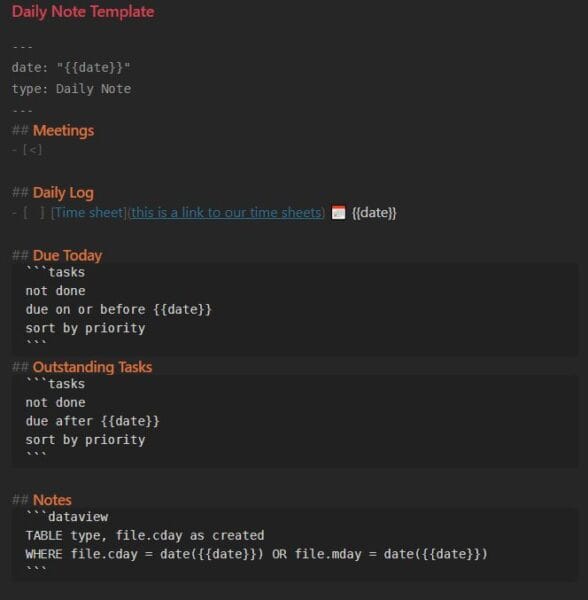
This has a space for me to create notes for any Meetings that day. I really like doing this, so when it is time I can click the link to create the record – or, even better (if I’m in an organised mood!), I can prepare the meeting file ahead of time with a template and filled in expected attendees etc. If I have info I need to present or questions ahead of time I can get all that ready.
Then I use a heading for a Daily Log for quick notes, brain dumps and adding general tasks on the fly. This is my “bullet journal” or “rapid logging” section – how much I use this really varies depending on my mood and what I have on. In my template for my Daily Note I also keep a preloaded task to remind me to fill in my timesheet at the end of each day with links to the system so its just a click away!
Using the Tasks plugin I display tasks from my database that are due “today”
and then under than all outstanding tasks from my database grouped by priority and which folder they are in (another advantage of using project folders).
Right down the bottom a dataview query to show the notes that were created or that I edited on this date. Sometimes its useful to know what I touched that day!
Projects
Each project I’m assigned to will have its own main note which is the real heart of my system. My active projects will have a file name with 00 prefix to make it easier to search when I want to create links to it. I remove that when it’s completed.
I work on implementing collections management software, which includes data migrations, so there is a lot of troubleshooting and information to keep track of. I can be assigned to a lot of open projects at one time, and they can drag on or go quiet for months, so I need to have everything I need to know if I’m coming back cold later when I’ve forgotten what I did!
My project note will have some details for quick reference, and links to all the various useful documents and folders on our company intranet and PM systems for quick and easy access. On my computer I also keep my work log documents in this notes folder so I can easily link to it from here to open it up when I need to check something. So much easier than digging through folders.

I’ll use this note to dump in my general troubleshooting process and to keep track of the major outstanding issues. It serves as a “homepage” for the project, so I’ll also link to other relevant notes, and at the bottom use a dataview query to list all the notes that have been linked to it.
At the top I keep a running “Status” section that I pop a quick update in every time a task is completed or something happens on the project. This is so it is easy for me to pull up the information for the project manager.
I also love the new Properties feature that makes writing YAML smoother. I’ll use this to track the Status of the project, tags, and aliases for the page so I can easily create backlinks for it in other notes using acronyms and friendlier names.
I make use of the transclusion feature to embed bits of other notes into others quite a bit, but especially in this project note if something related was discussed in a meeting I can display a bit of that note in this one.
Info & How Tos
This is where my more general notes get dumped in, all the bits of information I pick up constantly from colleagues in our weekly triage sessions, troubleshooting and solutions, or notes on features in new releases that might be useful to recall at a later time.
I am trying to be really mindful about carefully tagging all these notes so make them easy to search in the future. I will at some point build some simple tag pages to pull everything together into a system that is more browsable for me.
Maps of Content
I love to make maps of content full of dataview queries and links to notes in my database, and links elsewhere, so I can really quickly access that I need.
My main one is the page with links to our internal project management portal, and a dataview query to the main page for all my open projects. I go to this a lot – it’s essentially like my dashboard.
I also have one that lists my notes from all my induction training sessions. I definitely need to build some more MOCs now I’m really getting into the swing of things in my job role, I’m starting to see some patterns in the things I keep looking for and need to make my self an easy way to jump to things I use a lot.
I also really like the Bookmark feature, which I’m starting to use to have shortcuts to my MOC pages. and my most used notes. You can also put bookmarks into groups which is fantastic.
I have really enjoyed getting started with a fresh Obsidian vault in this new job. This time I am really growing my Obsidian at the same time as my knowledge, so the vault is a reflection of my progress and that’s really satisfying!