I spent almost all of my Saturday this weekend on finally sorting out my Obsidian Vault! This task was long, long overdue so I’m feeling good about finally having it done!
I’ve had Obsidian for about as long as I’ve had this blog, which is a little over two years. I shared a post a while ago about why I chose this over the other note taking apps out there. I’ve tried a lot of different things in that time, and it had become something of a graveyard for abandoned projects. It was starting to feel haunted by those failed efforts, and I realised that was blocking rather than inspiring any flow of thought or creativity.
I have another Obsidian Vault that I use for work, and that works amazingly well because I know what I want to get out of it. That Vault lives on my work laptop and I will share at some point what I do with it (I have had a draft post of that hanging around for some time!). It’s been an absolute godsend when it came to starting my new job, and I’d struggle without it now!
What I needed to do was rethink my approach to my personal note taking, clarify why I’m creating notes in the first place and then reorganise how I structure them to make everything as easy as possible. Since I’m not using it to run a business or deliver defined projects, I’ve found it hard to nail this down. So, I started by asking myself again – why do I want to take all these notes?
Why do I use Obsidian?
- This is a very similar answer to why do I blog? because my notes are to support my blogging and writing endeavours. I want to understand myself, my place in the world around me and to reflect on growth and self-improvement. To that end, my notes should help me answer the questions that I ask myself.
- As I am seeking to answer those questions, and find what resonates with me, that should aid my creativity (be that writing, embroidery or anything else) but this is the goal I’ve been most failing to meet.
- To track and reflect on my reading. I log all my reading in Goodreads, and share my reviews to this blog (as you know!) and to LibraryThing (for our home library), but my notes should provide a way to draw more connections and understand my own reading preferences better.
- There are the occasional projects for which keeping more detailed administrative or informational type notes and tasks is useful, but these are few and far between so should not be the primary focus. In the past this has been things like the setup for this blog (which I pay to self-host), selling my house, planning my Canada trip and preparing for job interviews.
I guess to simplify things, whatever information or thoughts input to Obsidian should help me with clarifying, self-improvement and creative output.
Before I explain how I’ve reworked everything, I want to run through some of the history of my Vault because I’ve definitely learned in two years what does and does not work for me when it comes to personal note taking. Like most newbies when I first discovered Obsidian I was blown away by it’s flexibility and potential, and I watched lots of YouTube videos of clever things other people were doing and I got carried away!
Here are some of my Obsidian Fails
- Daily notes! This is a big one! I’ve had a several attempts to make this work for me, but whatever format I just don’t consistently use them, and I never read them back. Anything I write in there just gets lost, and I don’t think it’s a format that helps me meet my goals.
- In the early days of my Vault I’d periodically import a CSV of my Google Sheets Cycle Tracker in and I don’t really know why. I think the idea was I could tie that info to my daily notes that I never use! I don’t need this in two places, and it is very easy to download from my Google Drive if I ever did need it elsewhere.
- Tracking TV episodes (and Movies) I’ve watched. I just don’t remember to do it! I watch TV too fast, and too passively, to blog about it. Sometimes I wish I could stick to this because my memory is really bad, I don’t remember what happened in which episode of Star Trek and I wish I did… but I don’t really have a use for that knowledge, so this is one project I let go pretty early on.
- Tracking my reading directly in Obsidian. I’ve use Goodreads for this for years, and that syncs so nicely with my Kindle (yes, I am trapped in the Amazon ecosystem) that it is barely any effort so it was crazy to try to do this in Obsidian (again in the failed daily notes!). I have a good workflow for this now that syncs from Goodreads and my Kindle Highlights into Obsidian notes, I’ll try to share that some time!
- Writing blog drafts in Obsidian. Since I worked out how to connect my self-hosted WP blog to Jetpack I just use that app on my phone to start drafts now. It works great, or sometimes on my iPad I’ll directly work on drafts in the browser. I can then format properly as I go and that saves me time.
- Managing my workflow for blog posts. This was back when I thought I was going to be doing lots of proper research and writing well thought out articles, before I decided I’d just do whatever, spew out my half-baked thoughts and see what happens (I will eventually get back to doing more proper writing!). I experimented with the Projects and Database plugins for this, which are very cool but just not of use to me.
- Copying blog posts into Obsidian. I was doing this as a kind of back-up but it’s only really easy to do when I’m on my desktop PC and that’s a rare event these days. I since have found out there is a WP plugin that will export all your posts into markdown format, so if I really do need back-ups – or decided to delete this website – I can use that and easily plop them into the vault.
- Any kind of habit or goal tracking! I am historically bad at this, it doesn’t motivate me for longer than a few weeks and it just leads to feelings of failure when I drop off. I’m now trying to get away from this kind of “all or nothing” mentality. 1
- Tasks or to do lists. Just not something that is useful for me in every day life unless it’s part of a larger project, but those are rare.
- Notes on people I know – not in a creepy way, just birthdays, address etc. This is all in my phone (and by extension my Google contacts) so I don’t need to duplicate that effort. Again I should be able to easily download a CSV from there should I need it.
- Recipes. If it’s worth keeping I actually write this in a paper notebook because it’s easily to work with when you’re actually cooking! I though I do keep a note of “recipes to try” where I paste the URL so I can find it again.
- Podcasts I’ve listened to. I used to try to have notes on every episode (again part of a failed daily notes endeavour), but there was no good reason to do this! Now if there was something that particularly resonated I’ll look for a transcript online and make a note from that so I can highlight and keep the interesting parts.
So you can see, quite a lot of failed ideas there! There are also many things it has been fantastic for, which I need to lean into with my restructure.

Here are some of my Obsidian successes
- Copying in my notes and highlights for articles and Kindle books. There are lots of plugins to help with this. I used to use Instapaper to save and highlight in blog post and online articles and that would let you share notes in markdown format, but since they massively jacked up the price I am going to explore Omnivore as an option.
- Planning and tracking one off projects like when sold my house and planning out my Canada trip, it was really useful to have the itinerary (and all the PDF supporting docs) in Obsidian on my phone when we travelled. I also use it to keep a travel journal while we were there which was incredibly helpful when it came to making my scrapbook!
- I have a great workflow now using plugins for Booksidian and Kindle highlights to seamlessly sync in my reading and highlights. These days I write my review on the blog first, then I copy that to Goodreads and from there sync it into Obsidian. I have a nice reading “dashboard” too which I’ll share some time!
- Since they added the canvas features I can now make mind maps in there, and I love a mind map to think things through!
- I honestly credit Obsidian with landing me my new job! I wrote a blog post about this, but all the tools it gave me were invaluable for helping me link together and structure my thoughts for my job interviews.
Ok! So, armed with the knowledge of what did and did not work about my original Obsidian Vault I could set about cleaning it up to make it work better!
The clean up
Bin it
The first thing I did was take out all my old daily notes. These lived in their own folder, so that was really easy to do. I created a second vault to serve as a back-up, just in case I ever did need anything in them. I also deleted quite a few notes I deemed useless as I went through. I was quite ruthless with this!
Asking Questions
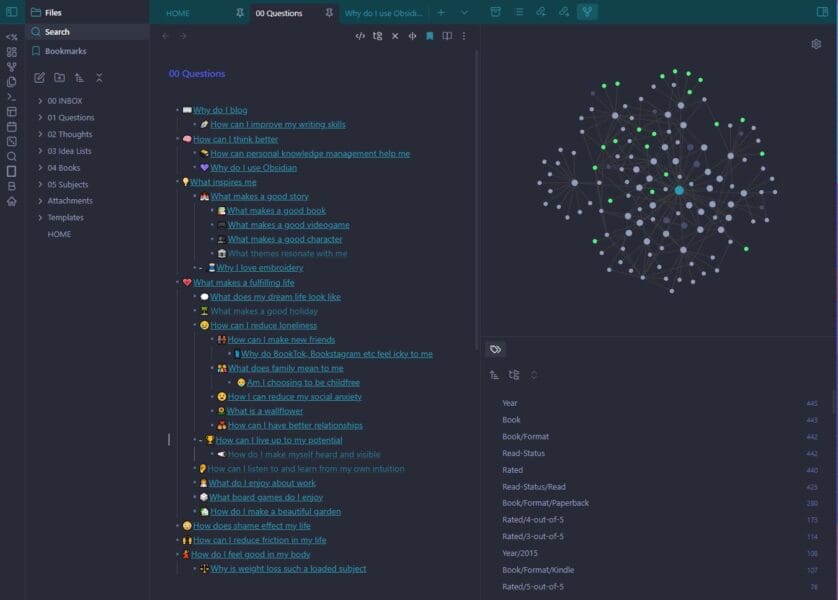
In answering the question “why do I use Obsidian” I’d realised that I wanted to use it to help me answer the questions I ask myself! So this was how I wanted to approach my notes.2 I actually already had a note (from when I read Building a Second Brain) that contained a list of the questions that rattle around my head. I used this as a starting point and wrote a quick list from the top of my head of everything I thought I was seeking to answer through keeping notes.
The idea is that my notes should be trying to answer those questions, and I hope framing it like that will encourage me to engage better, to think more and to make more connections.
Each question in the list I made a wiki link, so that any of them that don’t exist yet will be automatically connected when I add later, and I can use my big Questions note as a Map of Content (aka a MOC).
Some questions are raised in answer to others, so by the time I’d finished the whole clean up exercise, including reviewing each note, I have 40 questions in total, but to give you a flavour of the headline ones:
- What makes a fulfilling life?
- How can I reduce loneliness?
- How can I have better relationships?
- What inspires me?
- What makes a good story? (to me)
- What makes a good character? (to me)
- How can I feel good in my body?
- How can I reduce friction in my life?
Reviewing notes
Then I set about the long task for reviewing everything in my database and working out how each note answers my questions! I found this interesting because it was clear that I’d been keeping notes that sought to do this, but I just hadn’t been framing them in that way. Where it made sense I changed the title of note to the appropriate question. I also ended up merging quite a lot where I’d set up three or four separate notes that all related to the same thing (I think I had 5 different notes on “blogger inspiration” and some were essentially duplicates!).
Where questions were related I added links between them. I already had been pretty good with tags, but where I wanted to make adjustments I did a bit of retagging and on the main question notes I added a dataview query to return notes for the appropriate tag. I’m hoping that’ll make it easier to browse connections.
Rethinking Folders
I know the Obsidian community has conflicting thoughts on the use of folders, but I am a folder guy. I’m a trained Librarian so I like some level of browsable categorisation, and I don’t like a chaotic cluttered file list. My folders did need a rejig along with the other changes. I won’t bore you with this but what I have now is:
- 00 Inbox: for new notes to keep my sidebar tidy. I’ll periodically process these into the proper folder.
- 01 Questions: all my questions are in here, for easier browsing.
- 02 Thoughts: this is a catch all for more general journaling and thoughts.
- 03 Idea Lists: this is where I want to put basic idea lists for blog posts or embroidery pieces. Probably won’t every have much in here.
- 04 Books: this is a big folder and the only one I didn’t touch, it has all my book reviews (since 2018), notes for some authors and series, and bits like reading reviews.
- 05 Subjects: contains subfolders to broadly categorise notes into things like blogging, career, exercise, travel, games etc
- Then I also have a folder for my Attachments and my notes Templates.
I no longer have any kind of “Projects” folder because I just don’t really have personal projects that require that, and if I ever do – like planning another trip – I’ll stick it directly in the sidebar while it’s active then file it in the Subjects when it’s done.
Going forward
I am excited about the potential of this new Questions system, it feels like it makes a lot more sense for my brain now. Next I need to review my tags and clean all that up, I like tags for searching and creating softer links between notes, but I don’t think I’ve used them consistently at this stage. I have the Tag Wrangler plugin which should make doing so easier but it’ll still take some time and thought.
I’m hoping this process will help me write more on the blog, and I also might implement some kind of new tagging discovery system with my posts but that’ll be a way down the line.
- See my post on Atomic Habits for more thoughts on this! ↩︎
- I think the kernel of this idea can from browsing Tracy Durnell’s blog and seeing her Big Questions pages! ↩︎