


Probably not useful for anybody else, but I’m excited about this process! This is how I’m using ComicRack + Comic Vine scraping to generate .md notes for Obsidian!
Obsidian’s bases update came alone at the exact same time I was trying to find a solution to tracking all the Digital issues of comics I’ve been reading on Marvel Unlimited.1
Previously, I’d been using Goodreads and selecting collected trade paperback volumes, but with Claremont’s Uncanny X-Men, I’d run out of Marvel Masterworks! Plus, it meant I’d get confused and forget what was in which issue.
I looked at some other apps I found suggested online, but they were very geared towards collectors, especially physical collections, and the features were overkill, while not having the basics I wanted. All I needed was a space for when I read it, a rating and some notes!
Bases with all its lovely new features seemed like the perfect solution for me! At first, I was just planning to generate a simple spreadsheet of all the comic book issues I have read or I’m planning to read, and use the JSON/CSV Importer plugin to create some basic notes. But then… my wonderful husband (who also loves a database) told me about how he uses ComicRack for his digital comic collection and how it’s possible to scrape delicious data from Comic Vine, and that he thought it was possible to export all that to XML…
And then my brain was whirring! And now this was all I was going to be able to work on for my few days off work!
I’ve covered this before, but I fucking love a database. I also love manipulating data formats to migrate data! I do that for a living. Over the last year, I’ve been learning XSLT and loving it, so this was a very exciting opportunity to play about with XML transformations and simple PowerShell scripts, in my free time – with myself as the customer (not worrying about budgeted hours!)!
I knew I could very easily knock up some XSLT to transform XML into a markdown file I could pop in my Obsidian vault.
Before I run through my process, I want to note that both ComicRack and Comic Vine exist as awesome community projects, particularly ComicRack, which is a brilliant programme for managing digital comics.2 The original developer dropped it, but it lives on through a community version available on GitHub.
Tools
- ComicRack with Comic Vine Scraper plugin, and Data Manager plugin.
- Comic Book cover images, downloaded from Comic Vine.
- XSLT script for XML to MD transformation.
- Saxon Home Edition to run XSLT.
- PowerShell scripts to create placeholder comics.
- Obsidian.. obviously.
Essentially, the method is to create a placeholder “comic book” file in ComicRack that is good enough for the scraper plugin to recognise it and pull back lovely data. Then export a backup of that in XML format that can be transformed to markdown!
This looks like a lot, but now I have it all set up, it only takes 10-15 mins, depending on how many new issues I want to load, because the most time-consuming part is downloading covers. I will only do this for future comic books I intend to read, so I have a ready-to-go “queue” of notes I can then check off as read and add my thoughts to as I read.
Creating placeholder “comics” in ComicRack
Digital Comic book files are like zip files full of images. So, to fake a comic book file, all I needed was a cover image for each issue, and then I could use a PowerShell script to zip them all up into individual zip files.
I got them from the Comic Vine website (hopefully meaning they were more likely to match correctly for the scraper!). Downloading these doesn’t take too long. Now I’m up and running with this process, I just do a batch of whatever I’m planning to read. This last lot was for a short run of New Mutants issues from 1990 (Cable’s first appearance in #87 to the final #100 issue3), and it only took a few minutes.
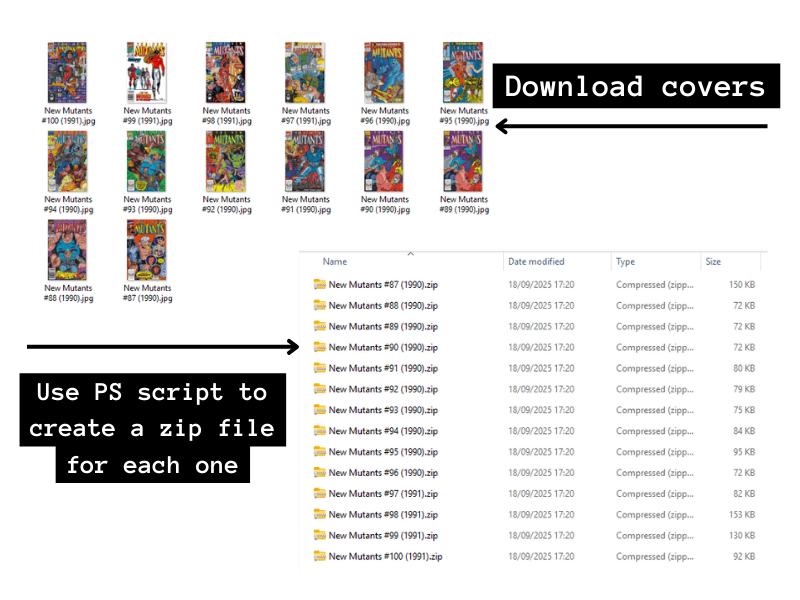
The important thing is to carefully name the files with the series name, the issue number and the year in brackets. E.g. New Mutants #87 (1990). This makes it easier for Comic Vine Scraper to automatically recognise them.
For my workflow, I keep separate folders: one where I keep the covers, one for PS to create the zips in, and one where I output the eventual markdown files. I want to keep the original JPGs to use as cover images in my Obsidian Vault (more on that later).
This is an example of the PS script. I only know extremely basic PS, so I usually get ChatGPT to help me out. It’s slowly helping me learn how to do things!
$source = "<FOLDER OF IMAGES>"
$dest   = "<DESTINATIONS FOR ZIPS>"

New-Item -ItemType Directory -Path $dest -Force

Get-ChildItem -Path $source -File | ForEach-Object {
    $zipPath = Join-Path $dest ($_.BaseName + ".zip")
    Compress-Archive -Path $_.FullName -DestinationPath $zipPath -Force
}
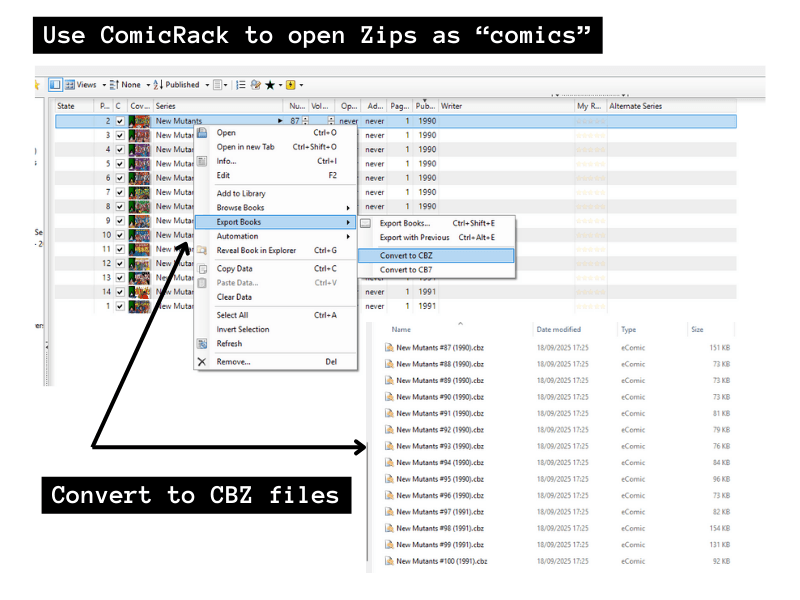
Once I’ve got my zips, I can open up ComicRack and add them to my library. Then they can be converted to CBZ format by selecting them all, right-click> Export books > Convert to CBZ.
Scrape data from Comic Vine
Now that they’re in my library, I can use the Comic Vine Scraper Plugin. This does need an API key from Comic Vine, but that’s free and easy to get with an account. There is an hourly limit on calls, which is no problem unless you’re trying to do hundreds in one go.
Select the comics and then select the scraper tool, and start scraping!

As long as I name the files well, and have a good image, I’ve found it’s very good and recognising the series. Do check the source, though; sometimes there are other language variations from different publishers!
This should then populate the comic files with lovely added data like the writer, inkers, colourists, any events or story arcs, characters, teams, etc in the stories. Specifically, I wanted to be able to record the writers, artists and story arcs, but all of it is potentially useful. Once scraped, you should be able to see it all in the comic book record.
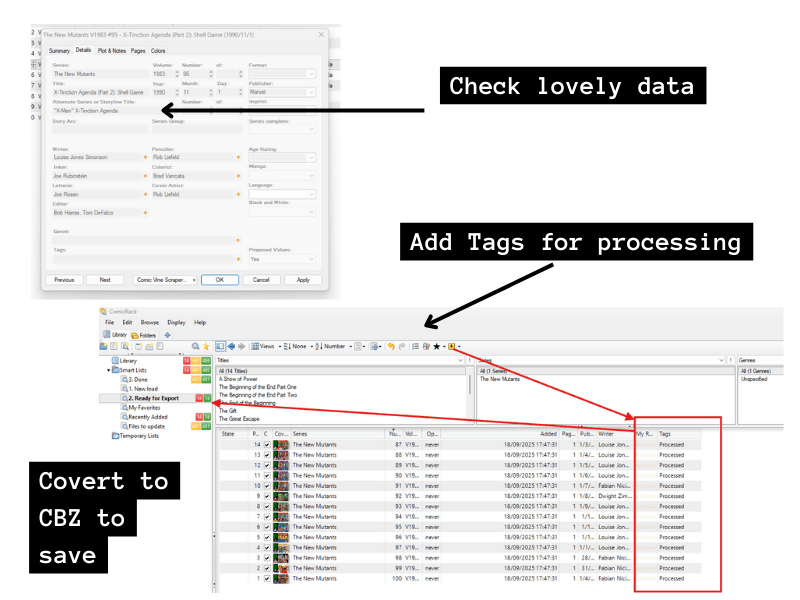
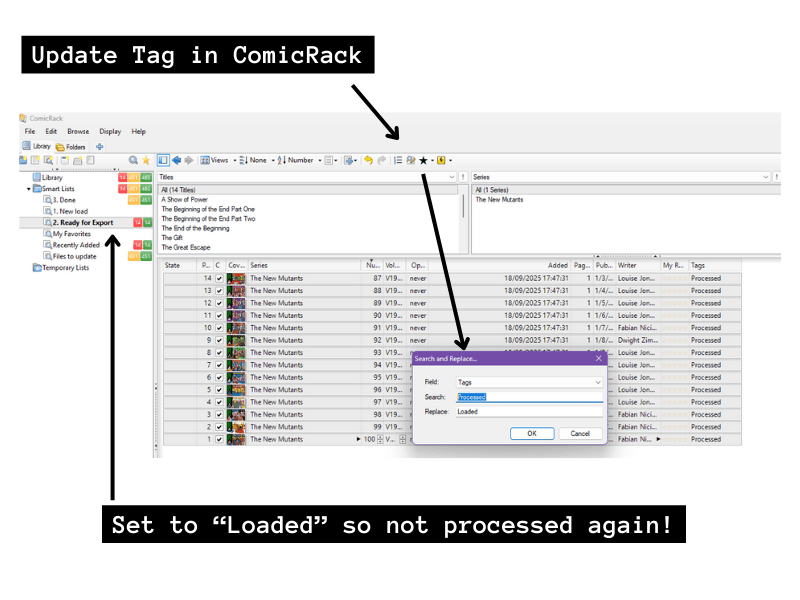
I used the Data Manager plugin to set up an automatic script that will add a tag of “Processed” for anything that has loaded data from Comic Vine. I use this to track the status of issues in the Smart Lists, so I can tell the ones I’ve already done when I’m dealing with the XML in later steps.
Then, with all the lovely data loaded, I make sure it’s saved by converting the comic books to CBZ again.
Export to XML
Now, to export all that to XML, I go to Preferences > Advanced > Backup Database. This creates a zip file that has an XML with the data for every comic book in my library. I don’t know if there is a way to do this for just selected records – it seemed to be all or nothing, which is why I am using the Tag field above to track whether an issue has already been processed.
Transform to Markdown
I get that XML file out of the backup zip and use an XSLT script to transform it to markdown files for my Vault!
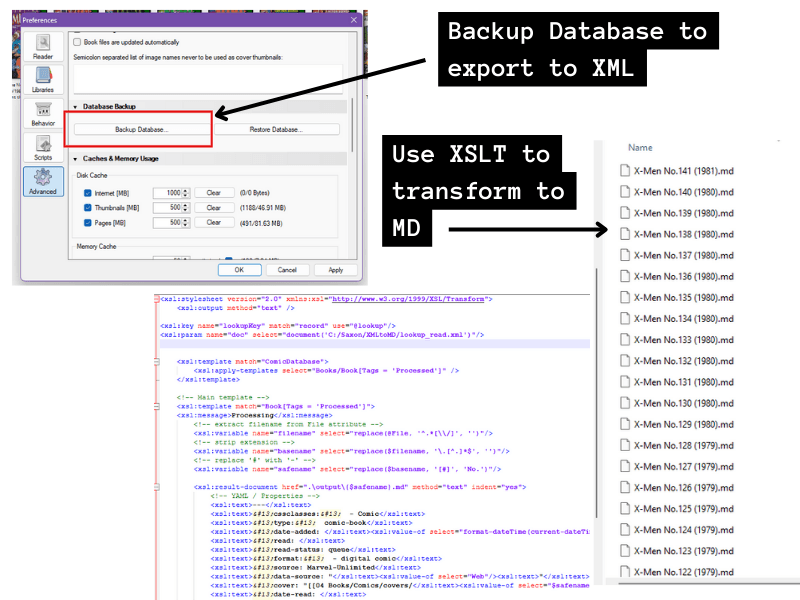
I just use NotePad++ to write this because I’m basic and I’m actually not a coder! I’ve learned enough “on the job” at work to find this easy to do (yay progress!), but for the trickier bits, I do find ChatGPT a great resource for this sort of thing. This is low-risk basic scripting – it’s either going to work or it won’t, and I know enough now to know if it’s telling me something wrong!
The new to me bit I had to work out was how to generate lots of separate markdown files from the one XML source file. With XSLT 2.0 it’s easy with <xsl:result-document> (Some info from Saxonica).
One important bit to note is that I had to use # in the comic book file names for Comic Vine Scraper to work efficiently, but having a # in the markdown file name for Obsidian is not allowed. So I am replacing ‘#’ with ‘No.’ for the resulting markdown file and also the image file I’m going to link to, so I can display covers in my vault.
I also only want to create notes for the books where I have a tag of “Processed.”
For example, something like:
<xsl:stylesheet version="2.0" xmlns:xsl="http://www.w3.org/1999/XSL/Transform">
<xsl:output method="text" />
<xsl:template match="ComicDatabase">
<xsl:apply-templates select="Books/Book[Tags = 'Processed']" />
</xsl:template>
<!-- Main template -->
<xsl:template match="Book[Tags = 'Processed']">
<!-- extract filename from File attribute -->
<xsl:variable name="filename" select="replace(@File, '^.*[\\/]', '')"/>
<!-- strip extension -->
<xsl:variable name="basename" select="replace($filename, '\.[^.]*$', '')"/>
<!-- replace '#' with '-' -->
<xsl:variable name="safename" select="replace($basename, '[#]', 'No.')"/>
<!-- create .md file for each book -->
<xsl:result-document href=".\output\{$safename}.md" method="text" indent="yes">
<!-- START YAML / Properties -->
<xsl:text>---</xsl:text>
<xsl:text> type: comic-book</xsl:text>
<xsl:text> date-added: </xsl:text><xsl:value-of select="format-dateTime(current-dateTime(), '[Y]-[M01]-[D01] [H01]:[m01]:[s01]')"/><xsl:text></xsl:text>
<xsl:text> read: </xsl:text>
<xsl:text> read-status: queue</xsl:text>
<xsl:text> cover: "[[Comics/covers/</xsl:text><xsl:value-of select="$safename"/><xsl:text>.jpg]]"</xsl:text>
....!!! VALUES AND TEMPLATES FOR EVERYTHING I WANT !!!! ...
<!-- END YAML / Properties -->
<xsl:text> --- </xsl:text>
<xsl:text> ![[Comics/covers/</xsl:text><xsl:value-of select="$safename"/><xsl:text>.jpg]]</xsl:text>
<xsl:text> ## Summary </xsl:text>
<xsl:value-of select="Summary"/>
</xsl:result-document>
</xsl:template>I run this with Saxon. I like to set up a little Windows batch file to make it a nice one-click run.
Drop into Obsidian
Once I have my lovely markdown files, I drop them into my Obsidian Vault. I could have them created directly in my Vault, but that feels risky. I prefer to check them first, then manually drag them in.
I also run another PowerShell script on my image folder to change the ‘#’ to ‘No.’ in the file name and drop them into the appropriate folder in my Vault, too.
Get-ChildItem -File | ForEach-Object {
    $newName = $_.Name -replace '#', 'No.'
    Rename-Item -Path $_.FullName -NewName $newName
}
What I could actually probably do to streamline this is initially name it with “No.” when I save the .jpg and then use the zip PS script to name the zip files with ‘#’ .. but I’m fine doing it this way. Plus, I think typing # into the file name when I download the images is easier than ‘No.’! Seems like swings and roundabouts.
Right, so once everything is sitting happily in Obsidian, it’s just a bit of clean-up in ComicRack. I set all the ones I just processed from a Tag of “Processed” to a Tag of “Loaded” using a search and replace.
And that’s it!
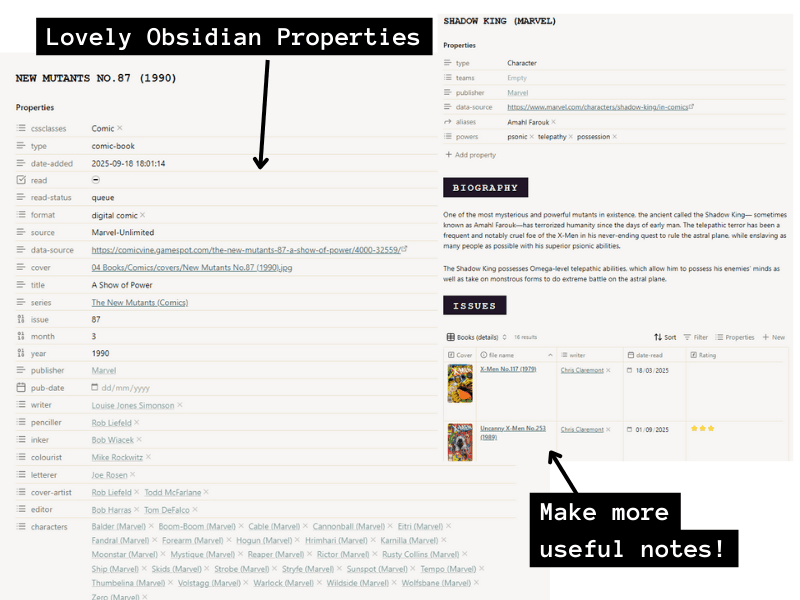
Now I can admire my notes!
Yes, I go overboard on the links for almost everything in these properties. I will probably never actually create notes for most of these, but they are there in case I do. Some characters capture my attention more, and I want to make notes about them – either because I love them (Mr Sinister), or I keep getting confused about who/what they are (Shadow King, the Siege Perilous)!
When it comes to writers and artists, I’ll be able to look back over what I’ve rated issues and see who my favourites have been.
I also really like to be able to create notes for story arcs so I can pull all the issues together. This has become quite a nightmare with the X-Men! I’ve just had to start reading New Mutants because I was getting lost with stories (X-tinction Agenda) spanning Uncanny X-Men, X-Factor and New Mutants! (This is annoying enough in 2025 with Marvel Unlimited. I am sorry for those who had to buy physical issues in 1990!).
Comic Vine is a volunteer project, so the quality of data entered for issues is variable. Some have a giant retelling of the whole story, some a brief summary, some have misleading data – like a character is listed when they were only mentioned once by someone in the story. I’m correcting that as I read the issues and mark things as read. That is not a complaint, though – it’s absolutely amazing that I can get all this information in minutes!
Dashboard with bases
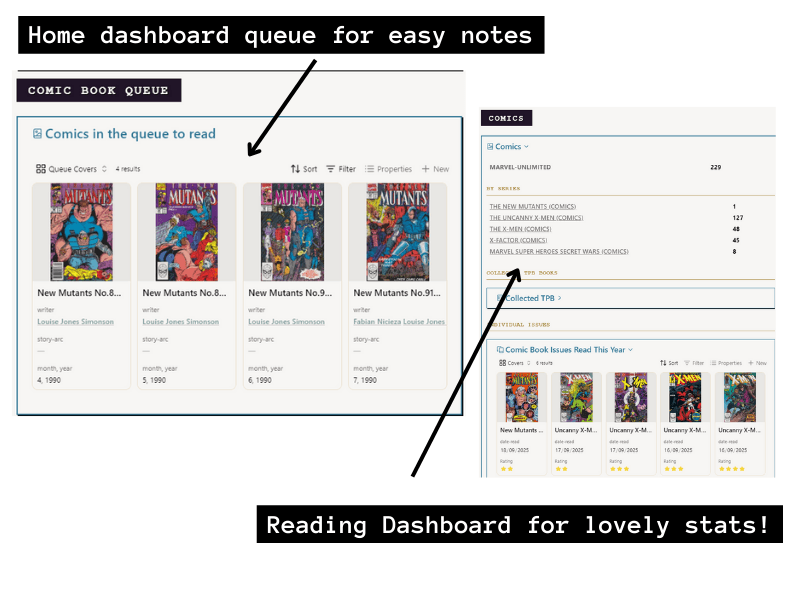
Now on my home dashboard, I have a nice little queue of the ones I’ve not read, using a base code block and sorted by year, month and issue. Every morning, I usually read one or two issues while I have my morning cup of tea, I’ll go in and mark it off as read, and pop in a quick rating and maybe a few notes for myself.
I have also built a nifty comic book section into my Reading Dashboard so I can keep count of how many I’ve read and which series.
It’s been a few weeks now, and this method of tracking my comic book reading is working really well! It makes me stop between issues to think and jot down any thoughts, which I think is helping me to remember what I’ve read. Before, I’d blast through a number of issues at once and get confused about what happened when. I think it’s also going to help – as I carry on reading X-Men – to make notes on the increasingly complicated lives (and families!) of characters like Scott Summers and Jean Grey!
I do need to keep an eye on storage space for my Vault now that I’m loading in more images. One thing I will add to this process is to resize all the cover images before I put them in Obsidian. I don’t need large or high-quality images for my purposes. It’ll be fine on my desktop PC, but I have Obsidian Sync and access my vault a lot on my phone and iPad, where storage space is more of a concern.
Footnotes
- I am writing this after Disney-owned ABC cancelled Jimmy Kimmel for being critical of Donald Trump. We pay annually for Marvel Unlimited, and it renewed two months ago, so they already have our money. ↩︎
- What happened to ComicRack? reddit post ↩︎
- I don’t really enjoy The New Mutants – I am too old to enjoy teenage characters! – but Cable is cool AF, so I was curious about his introduction! I also don’t really enjoy X-Factor but feel forced to read them, otherwise I miss half of what is going on in all the endless crossovers with vastly more enjoyable Uncanny! ↩︎




Ok, so three things. First, OH MY GOSH IS THIS BADASS. I was literally in awe reading this. The amount of detail, work, and time you put into creating this incredible database is sooooo impressive. WOW. Second, I have literally never thought about this – about tracking what I read, when I read it, and my initial thoughts – ever before in my entire life. And I’ve been reading comics since I was a kid XD. I’m now wondering what insights I lost along the way! I guess I just took it for granted that I’d remember reading it. But now I want more data! Third, I had the EXACT SAME PROBLEM with the Claremont run on Goodreads! In fact that’s what completely threw me off Goodreads and I just gave up and I sometimes think about going back and starting fresh but it seems overwhelming. Fourth (oh! bonus thought I didn’t realize at the start!), I do think it was easier with physical comics in the 1990! I read X-Men like it was my job when I was a kid. So I just had all my comics in their little box and when there was a big crossover, I’d just take all the issues in it and file them together. And I would file them with the comics I liked best. So, for example, “The Phalanx Covenant” with ‘X-Men’ or ‘Uncanny X-Men,’ not ‘X-Force’ or ‘Excalibur’ or what have you.
Though that was only easier from a filing perspective and certainly not from a PHYSICAL SPACE STORAGE perspective because now the only rooms in my home that don’t presently have comics stacked, tucked, filed, or boxed SOMEWHERE are my kitchen and the bathrooms XD.
Thank you Michael! Yes I did spend a few days perfecting this 😂 but it’s very satisfying now!
My memory is really rubbish for things I read or watch, and I’d also not thought about properly keeping notes on my thoughts until a couple of years ago and I’m only doing it consistently now, finally!
Hopefully it’ll help me collate some monthly reading throughs more easily. I definitely read a lot of wild plot points in September!
What’s funny is I ALWAYS take notes in my books…but I’d NEVER write in one of my comic books the way I write in my novels and nonfiction books. So you think I’d’ve considered a way to take notes on my comics long ago! I mean I do if I’m working on a post but I don’t do it just in general like I do with everything else I read. So I applaud your innovation and appreciate your putting a spotlight on this glaring hole in my own reading and notetaking ;D.
Will there be a post about the most wild plot points you read in September?? Or should I ask and you share some of the highlights with me here? Because now I want to know!
Well you can’t write IN the comic books, that would be ludicrous!
I will say most of my notes are like 2 lines and along the lines of “Jubilee is the worst” 😂 but I think stopping to do that and give the issue a rating is helping me remember things instead of immediately forgetting!
I included a high level run down of the main arcs I’ve read through in my September Reading Roundup. I have recently gone through Outback Era to Siege Perilous reset which included Psylocke’s change … Might never get over that, why the fuck did they do that (I knew about it but it’s worse now I read and loved original Betsy!)
I am now at the end of Claremont, reset back to Prof X (broken legs again too 😂) and mansion and two official X-Men teams in different titles (which took some googling to work out!).
I’ll keep going until I get sick of it. I think the cool Jim Lee art and Gambit might take me further than the writing will at this point, but we’ll see!