

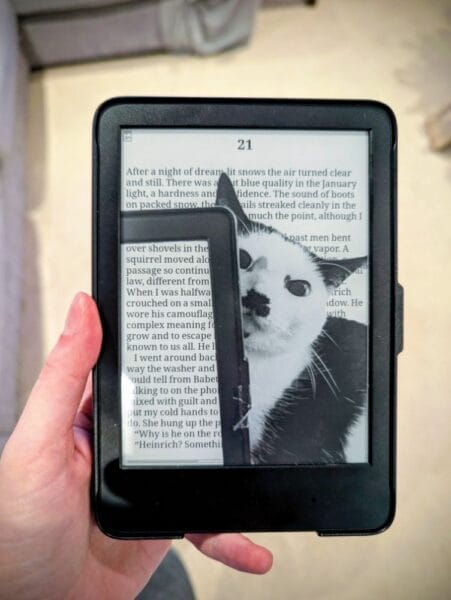
I had a lot of grand plans for my Christmas break, yet in Classic Alice style, I immediately got distracted by a shiny new side project.
The video It’s Time to Jailbreak Your Kindle by Damnit Jeff came up in my YouTube feed. I’m not sure why, but the algorithm Gods decided to serve it up to me, and I decided to click on it. It’s a great video, Jeff explains the reasons why you might want to jailbreak your Kindle well and tells you how to go about doing it in a very easy-to-follow way.
I had to do it.
When I first got a Kindle (over a decade ago), I thought about trying to jailbreak it because I wanted to have the Star Trek LCARS computer as my lock screen really badly… but I was too scared to do it; it seemed too complicated. Then I just forgot about it.
In the last year, I’ve been moving away from using Amazon and the Kindle store. I now buy my eBooks from Kobo or Google Books (or anywhere else) and sideload them, because I like to have a digital backup of my books that I paid money for! Because I do that, that means that my Kindle no longer syncs to my Goodreads account. And that means there are not really any features on the device that I am worried about breaking by jailbreaking it, and it seems like there are only gains to be had.
(The Goodreads thing is also why I’m considering finally trying a different reading tracking app this year – like The Storygraph or Fable, but maybe more on that later).
The video is 8 months old, so I had to use the instructions in Jeff’s follow-up from last month: Your Kindle Can Finally Be Jailbroken Again to do mine, and use the (hilariously ironic) AdBreak exploit. I could get away with that because I’ve kept my device in Aeroplane mode for months in fear of more updates that might break things for sideloading books, so my firmware was old enough for it to work.
I highly recommend you watch both of Jeff’s videos as well as carefully follow the https://kindlemodding.org guide. I followed both, as Jeff does a good job of demonstrating. It took me a couple of hours to do because I took my time, and it was a bit intimidating, but it wasn’t difficult.
One of the first things I did was to create myself a new sleep screen image! As soon as I saw some of the ones other people had created – and that transparency works on the images, very cool! – I knew the image I had to use! It had to be my photo of Kitler glaring at me from behind my Kindle! It brings my joy every time I pick it up.
Though I am still tempted to look for a Star Trek LCARS image that is the right size for my Kindle Paperwhite screen!
So now I will be using the KOReader application to access and read my eBooks instead of the native Kindle reader. It has an honestly overwhelming amount of options for how you can lay things out, and I know I have barely scratched the surface of it, but there are lots of things I like, such as different options for progress bars and reading stats. I haven’t had the time to really play around with that too much.
One annoying thing I found is that I had before converted all my Amazon eBooks to MOBI format, and KoReader won’t display covers from MOBI format. That took me some time to work out what the problem was! So, I’ve had to convert everything to ePub and fiddle with my Calibre settings to make sure only ePub format gets sent to my device.
When it comes time to replace my Kindle, I think I’ll go for a Kobo so I can borrow Library books on it, but in the meantime, the Kindle has plenty of life left, and it has felt good to de-Amazon it for now and be able to fix some of the things that frustrate me!
I love your screensaver!
I am definitely not a tech person and i’d probably break my kindle trying to do this but i’m glad you were able to, it also looks super fun tu customize afterwards. Please try The Storygraph!!! It’s amazing ☻
I am giving The Storygraph a try, it’s taking some getting used to but so far it’s ok!
I was just randomly searching for some articles about Fringe series, because I’m thinking of watching it. Your website popped up, and I ended up jailbreaking my Kindle:) And it’s fantastic, KOReader is the best.
Thanks!
(And yeah, I’ll probably watch Fringe)
It’s funny the places you can end up online (especially on my little website!)! I’m glad you are enjoying your “new” Kindle.. I’m still fiddling with KOReader but I agree it’s so much better!
And you should give Fringe a go!
Thanks for taking the time to comment 🙂